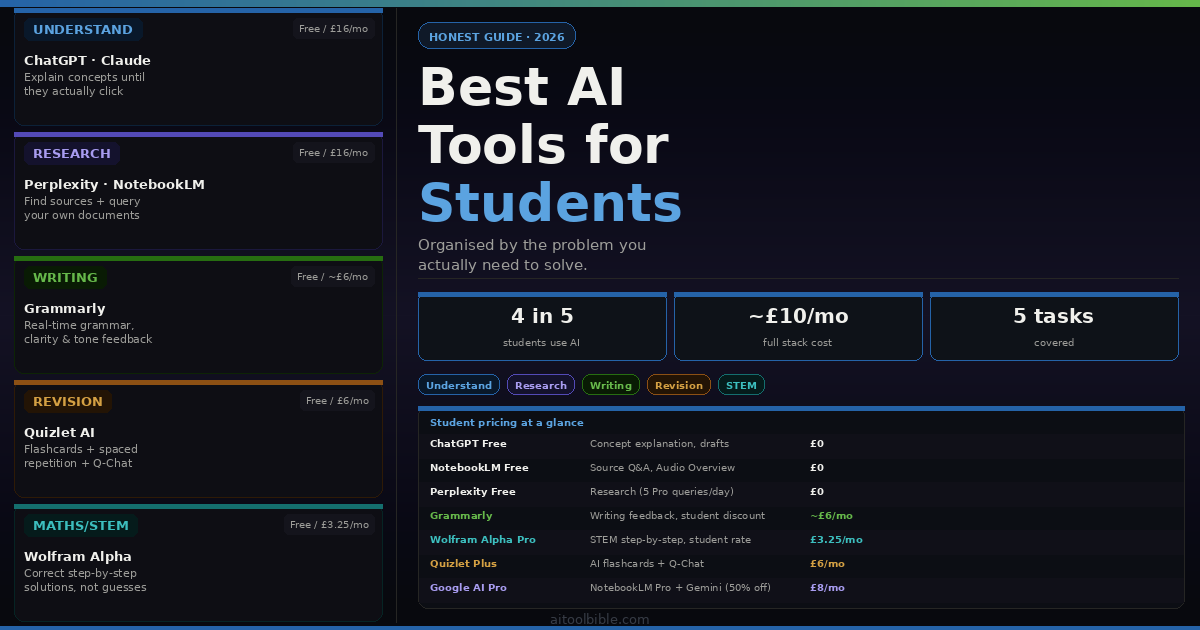
Four in five university students now use AI tools for their coursework. That figure comes from the Stanford AI Index 2026 — the most comprehensive annual audit of AI adoption globally — and it has essentially doubled in two years. The question for any individual student in 2026 is no longer whether to use AI tools, but which ones to use and for what.
Most student AI guides answer that question with a ranked list: ChatGPT first, then six others, brief descriptions of each, a pricing table. This guide does not do that. The reason is that the right AI tool for studying depends almost entirely on what you are actually struggling with — and a tool that is genuinely transformative for a PhD student synthesising fifty papers can be nearly useless for an undergraduate trying to understand a difficult concept in their lecture notes.
This guide organises tools by the problem they solve. Find your bottleneck, start there.
One note on academic integrity before anything else: every tool in this guide is recommended for legitimate academic use — understanding material, conducting research, improving your writing, and testing your knowledge. Using AI to generate work you then submit as your own is a different matter entirely, and most institutions now have detection systems that are far more capable than students expect. The tools here are chosen because they make you a better student, not because they skip the learning.
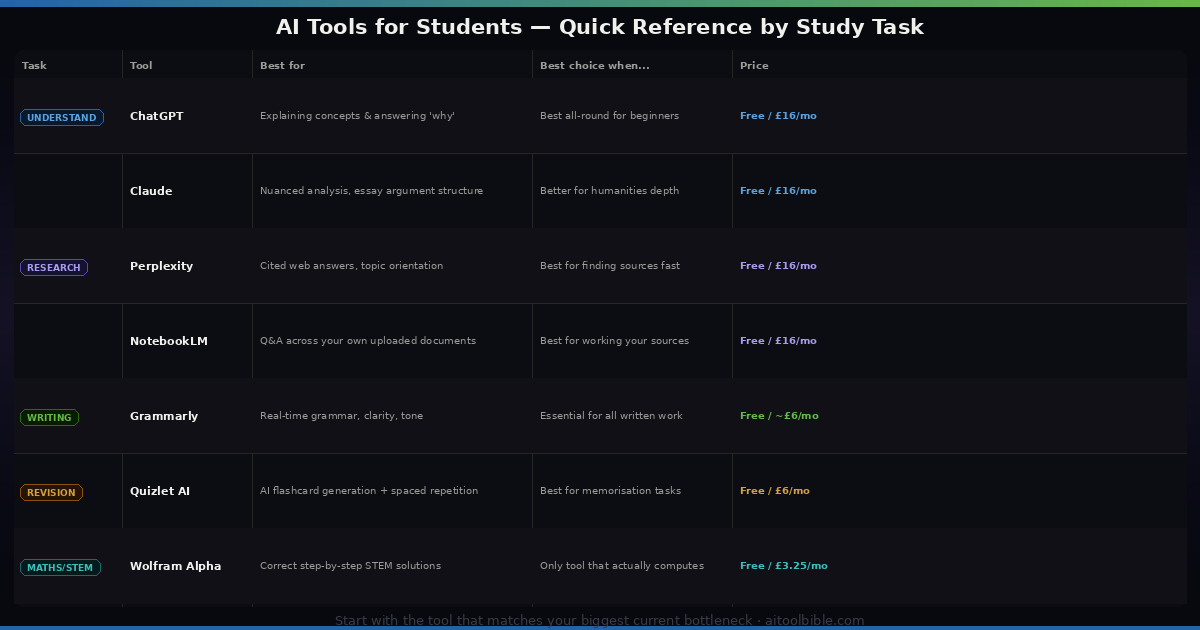
For understanding complex concepts: ChatGPT and Claude
The single most useful thing AI does for students is explain things in plain language until the concept clicks. Before AI, if you were stuck on a concept after lectures and the textbook was not helping, your options were limited: office hours (if available), YouTube, or going to bed confused. Now you have something better than a textbook and more patient than any tutor.
ChatGPT — best for versatile concept explanation
Price: Free / £16/month Plus
ChatGPT remains the most useful tool for this specific task because of two things: the quality of its plain-language explanations, and its ability to vary the approach when the first one does not land. Ask it to explain the Krebs cycle, get a first answer, then ask it to "explain that again as if I'm 15 with no science background" — and you get a genuinely different explanation, not a slightly rephrased version of the first one. Ask it to give you five practice questions on the topic and it generates a custom quiz from the same explanation.
This loop — explanation, question, explanation from a different angle, practice questions — is one of the highest-value study techniques available and ChatGPT makes it available on demand at any hour. The free tier is genuinely sufficient for most undergraduate concept work. ChatGPT Plus unlocks GPT-4o, which is meaningfully stronger for complex multi-step problems in STEM subjects.
The most important tip for using ChatGPT for learning: ask it to explain the reasoning, not just the answer. "What is the answer to X" is a much weaker prompt than "Walk me through how to think about X and why the answer follows from that." The first trains you to recall an answer. The second trains you to understand a method.
Claude — best for humanities and analytical reasoning
Price: Free / £16/month Pro
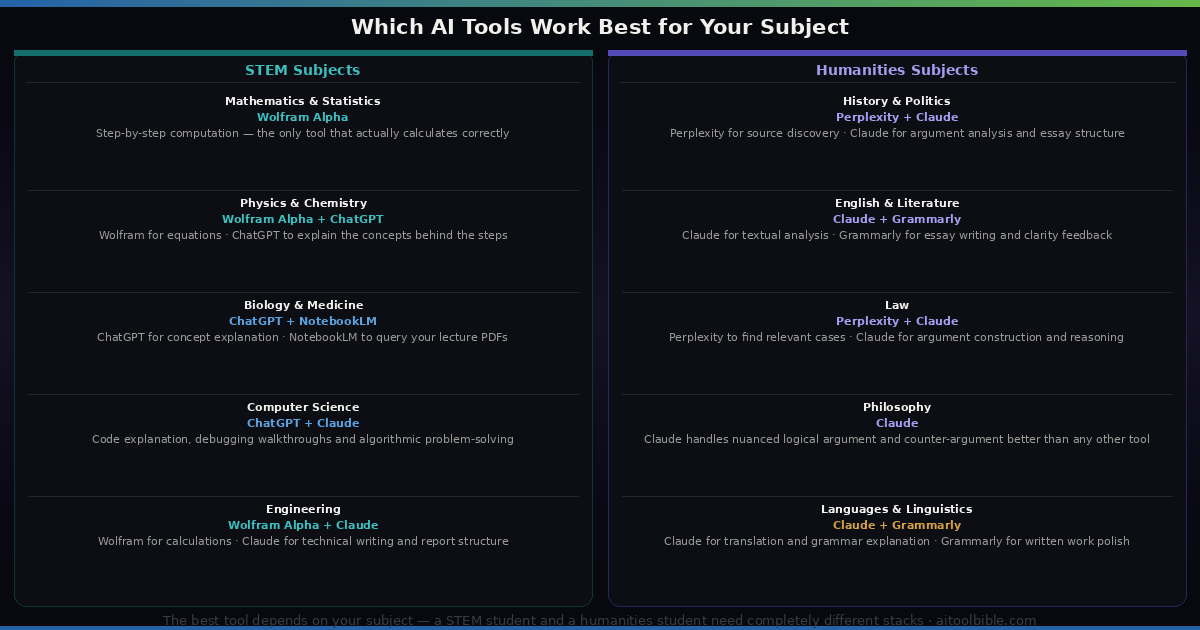
For students in essay-heavy subjects — history, literature, philosophy, law, politics, sociology — Claude handles nuanced analytical prompts more consistently than ChatGPT in most comparisons. Ask it to analyse the themes in a text, identify the strongest counterargument to a position, or help you think through the structure of a complex argument, and the quality of the engagement with the material is reliably high.
Claude Projects is particularly useful for sustained work on a single topic. Create a project for your dissertation, upload your notes, your reading list and your working bibliography, and Claude maintains that context across every conversation. You can ask "what does my reading on this period not cover yet?" and get a genuinely useful answer because the context is already there.
The free tier covers most undergraduate use cases. Claude Pro at £16/month is worth considering for postgraduate students who are using it intensively for dissertation research and drafting.
For research: Perplexity and NotebookLM
AI has genuinely changed what research looks like for students. Two tools in particular have replaced specific parts of the research process that were previously time-consuming in ways that add no academic value.
Perplexity — best for finding and orienting on a topic
Price: Free (5 Pro queries/day) / £16/month Pro
Perplexity answers questions with cited sources and is the fastest way to get oriented on an unfamiliar topic. Ask "what are the main debates in modern monetary theory?" and within 30 seconds you have a structured summary with clickable citations linking to the actual sources. This is not a replacement for reading those sources — but it tells you which sources matter before you commit hours to finding out.
The critical distinction: Perplexity is for discovery and orientation. It should tell you where to look, not what to cite. Always go to the primary sources before including anything in academic work. AI-generated summaries of papers are useful for deciding whether a paper is worth reading — they are not a substitute for reading it.
The free tier gives 5 Pro searches per day, which is sufficient for light research. The paid tier is worth it for students who regularly need to research new topics quickly, particularly in research-intensive degree programmes.
Google NotebookLM — best for working with your own sources
Price: Free (100 notebooks, 50 sources each) / £16/month via Google AI Pro
Once you have collected your sources, NotebookLM is the most powerful free tool available for working with them. Upload your PDFs, your lecture slides, your annotated readings, and YouTube lecture transcripts, and NotebookLM lets you ask questions across all of them simultaneously with cited answers that link to the exact passage they came from.
For a literature review, this is genuinely significant. Instead of re-reading twenty papers to find which one discussed a specific point, you ask NotebookLM and it finds it in seconds and shows you the passage. Instead of manually comparing what different authors say about a concept, you ask NotebookLM to "summarise what each source in this notebook says about X and identify where they disagree" and get a structured comparison.
The Audio Overview feature — which converts your uploaded sources into a podcast-style conversation between two AI hosts — is useful for revision. Upload your notes and readings for a topic, generate the audio, and listen during a commute or gym session. It covers the material in a different format, which aids retention.
The free tier is sufficient for most undergraduate and postgraduate use. Google offers 50% off the AI Pro subscription for eligible students aged 18 and over in the first year — making the full tier significantly more accessible.
For essay writing: Grammarly
Grammarly — best for real-time writing feedback
Price: Free / approximately £6/month with student discount
Grammarly is the most widely used AI writing tool among students, and for good reason: it is embedded in Google Docs, Microsoft Word, Gmail and every major browser, which means it is watching your writing wherever you write it. Grammar, clarity, sentence structure, tone, conciseness — it flags issues as you write them, which means the correction happens during composition rather than as a separate editing pass.
The most useful Grammarly feature for academic writing is not the grammar check — it is the clarity and conciseness suggestions. Academic writing tends toward long sentences, passive voice, and excessive hedging. Grammarly identifies these patterns and suggests cleaner alternatives. You do not have to accept every suggestion, but reviewing them teaches you the underlying rules over time, which is more valuable than having the errors silently fixed.
Student discount pricing varies but is typically around £6/month or less — significantly below the standard subscription price. The free tier covers basic grammar and spelling, which is useful but misses the tone and clarity suggestions that are most valuable for academic work.
One honest limitation: Grammarly's suggestions are calibrated for general professional writing, not always for academic writing conventions. Passive voice, for instance, is standard in scientific writing but Grammarly flags it. Use your own judgement rather than accepting suggestions mechanically.
For revision and memorisation: Quizlet AI
Quizlet AI — best for flashcards and active recall
Price: Free / £6/month Plus
Spaced repetition combined with active recall — retrieving information from memory rather than re-reading — is consistently shown in the learning science literature to be among the most effective study techniques available. Quizlet has built AI tooling on top of this foundation: upload your notes, your lecture slides, or any study material and Quizlet generates a flashcard set automatically. You then study through their spaced repetition system, which serves you cards more frequently the worse you perform on them.
The Q-Chat feature lets you have a conversation with an AI tutor that uses your own flashcard content. Rather than just being tested, you can ask for explanations when you get something wrong. This combines the retrieval practice that makes flashcards effective with the explanation capability that makes AI tutors useful.
The free tier covers basic flashcard creation and study. Quizlet Plus adds the AI generation and Q-Chat features that make it meaningfully better for exam preparation.
For maths and quantitative subjects: Wolfram Alpha
Wolfram Alpha — best for STEM problem-solving
Price: Free / £4.75/month Pro / £3.25/month for students
Wolfram Alpha occupies a specific and irreplaceable position in the student tool stack: it is the most reliable tool for getting correct, step-by-step solutions to mathematical and scientific problems. Where ChatGPT and Claude can and do make arithmetic errors in complex calculations, Wolfram Alpha performs the actual computation. It does not guess or estimate — it calculates.
For calculus, linear algebra, statistics, chemistry equations, physics problems and any other quantitative work, Wolfram Alpha should be your first tool, not ChatGPT. The Pro subscription adds the step-by-step solutions that are genuinely valuable for learning — not just the answer, but the method shown in detail. The student pricing at £3.25/month makes this accessible even on a tight budget.
The most effective combination for STEM problem-solving: use Wolfram Alpha to get the correct answer and see the steps, then ask ChatGPT or Claude to explain why the method works and what the steps mean conceptually. Wolfram Alpha shows you the how; AI assistants explain the why.
The honest guide to student AI pricing
Most of the tools above have genuinely useful free tiers. The honest picture on paid upgrades:
- ChatGPT Plus (£16/month): Worth it if you regularly use it for complex STEM problems or need GPT-4o's stronger reasoning. Not necessary for humanities students or lighter users.
- Claude Pro (£16/month): Worth it for postgraduate students doing intensive research and drafting. The free tier covers most undergraduate needs.
- Google AI Pro (£16/month, 50% off for students aged 18+): The best value student deal available in 2026. NotebookLM Pro, Gemini Advanced, and 2TB of Google storage. If you are already a Google Workspace user, this is worth serious consideration at the student price.
- Grammarly Pro (~£6/month student rate): Worthwhile for anyone who writes a significant volume of assessed work.
- Wolfram Alpha Pro (£3.25/month student rate): Essential for any quantitative degree programme. The cheapest meaningful upgrade on this list.
- Quizlet Plus (~£6/month): Worth it in the weeks before exams when you are generating a large volume of flashcard content.
A realistic combined cost for a well-equipped student AI stack: free tools plus Grammarly and Wolfram Alpha comes to approximately £10/month. That covers nearly every study need for most degree programmes.
A note on academic integrity
Most universities have updated their AI policies significantly since 2023, and the specifics vary considerably between institutions and even between individual modules and assignments. The general direction has been toward permitting AI assistance for learning and research while prohibiting AI generation of submitted work — but the details matter, and "details vary" is not an excuse for not checking.
Before using any AI tool in connection with an assessed piece of work, read your institution's policy. If it is not clear, ask your tutor directly. This is not a bureaucratic nicety — several universities have introduced AI detection as part of their submission process, and the consequences of a finding of academic misconduct for your degree are significantly worse than any short-term essay stress.
The deeper point is this: the tools in this guide are most valuable when they are making you better at the subject, not when they are doing the subject for you. Grammarly makes you a better writer if you read and understand its suggestions. NotebookLM makes you a better researcher if you use it to navigate to sources you then actually read. ChatGPT makes you better at understanding concepts if you use it to understand, not to extract answers. Used that way, AI tools are among the most powerful study resources ever available to students. Used the other way, they are expensive ways to damage a degree.