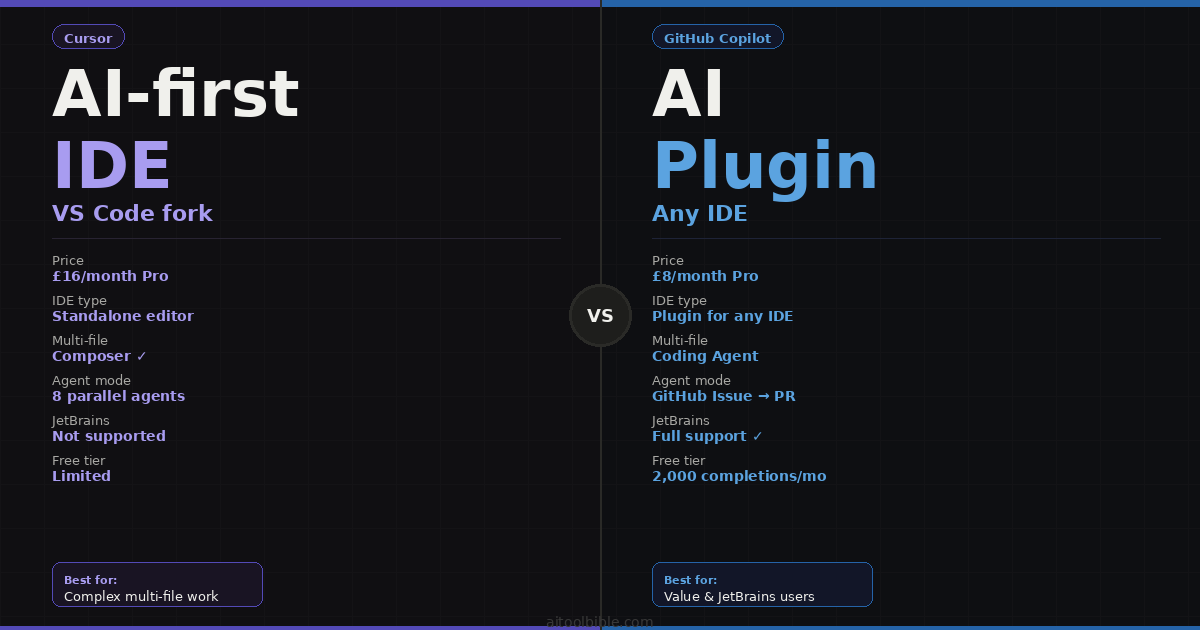
The debate between Cursor and GitHub Copilot is the most common tool decision developers face in 2026. Ask on Reddit, Hacker News or any engineering Slack and you will find experienced developers on both sides with strong opinions. Unusually for a technology debate, both sides are right — for different reasons.
Cursor and GitHub Copilot are not really competing for the same use case. GitHub Copilot is a plugin: it installs into the IDE you already use and makes you faster at the code you are already writing. Cursor is a platform: it replaces your IDE entirely and redesigns the development workflow around AI. Which is better depends entirely on what kind of work you do, which IDE you live in, and how much you want AI involved in your development process.
This comparison is based on current benchmarks, real-world developer testing and the verified feature sets of both tools as of April 2026. Claude Code is included as a third option throughout because it is directly relevant to many of the use cases where the comparison between the first two is genuinely difficult.
The fundamental philosophical difference is clear: GitHub Copilot focuses on augmenting your existing development environment. Cursor aims to redesign the development environment itself around AI. This distinction shapes every feature comparison that follows.
The quick verdict
- Best for most developers starting out with AI coding: GitHub Copilot — £8/month, works in whatever IDE you already use, immediately productive
- Best for complex multi-file work: Cursor — Composer and Agent mode are in a different class for large codebases and feature-spanning refactors
- Best for JetBrains users: GitHub Copilot — Cursor is a VS Code fork and does not support IntelliJ, PyCharm or WebStorm
- Best for the most complex autonomous tasks: Claude Code — terminal-native, 1M token context, highest coding benchmarks
- Best value: GitHub Copilot at £8/month — half the price of Cursor with 80% of the capability for everyday coding
- Best for enterprise teams on GitHub: GitHub Copilot — native integration with Issues, Pull Requests and GitHub Actions
What each tool actually is
GitHub Copilot was launched in 2021 by GitHub in collaboration with OpenAI and is now the world's most widely deployed AI coding assistant with over 4.7 million paid subscribers. It installs as an extension into VS Code, JetBrains IDEs (IntelliJ, PyCharm, WebStorm, Rider), Visual Studio, Neovim, Xcode and the command line. It does not replace your editor — it adds AI capabilities to it. The model powering it now supports multiple options including GPT-4o, Claude Opus 4.6 and Gemini 2.0 Flash depending on the task and tier.
Cursor is a standalone AI-first code editor built by Anysphere as a fork of VS Code. It looks and feels like VS Code — you can import your extensions, keybindings and settings — but every part of the editor has been rebuilt around AI capabilities that go beyond what a plugin can access. As of April 2026, Cursor has crossed $2 billion in annual recurring revenue and is in talks for a new funding round at approximately $50 billion valuation. It is one of the fastest-growing developer tools in history, with roughly 60% of revenue coming from enterprise customers.
The architectural difference matters practically. A plugin has limited access to your codebase — it can see the file you are in, some surrounding context, and whatever you explicitly include. Cursor, as the editor itself, can index your entire codebase and maintain awareness of your full project structure in a way that no plugin can match.
Autocomplete: where Copilot still leads on speed
For the moment-to-moment experience of writing code — the inline suggestions that appear as you type, tab to accept, continue — GitHub Copilot remains the benchmark. It is fast, unobtrusive and exceptionally well-trained on common patterns. For CRUD operations, React components, test stubs, API integrations and any code that follows familiar patterns, Copilot's inline suggestions are often exactly what you would have written, appearing before you finish typing the first few characters.
Cursor's autocomplete is also good, but slightly slower. The quality advantage Cursor has elsewhere does not translate to a significant difference in routine line-by-line suggestions. If your primary use of AI coding is inline autocomplete for everyday code — and that is the majority of most developers' AI interaction — Copilot provides a faster, more fluid experience at half the price.
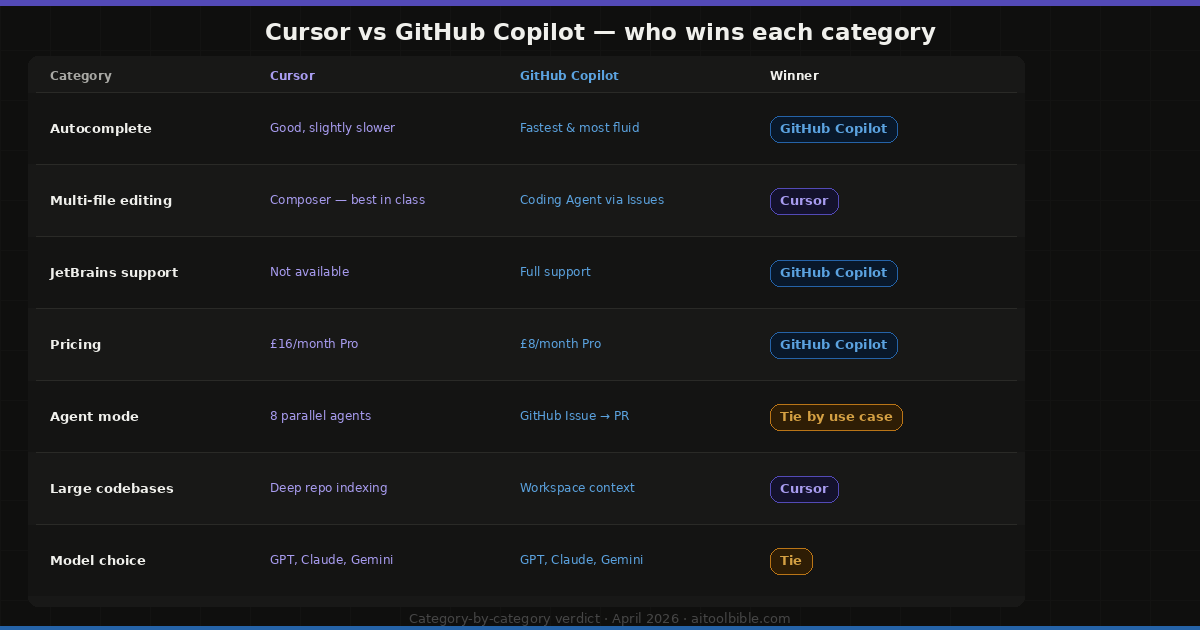
The verdict on autocomplete: GitHub Copilot for speed and fluency in everyday line-by-line coding.
Multi-file editing and Composer: where Cursor pulls ahead
This is where the IDE-versus-plugin distinction matters most. Cursor's Composer feature lets you describe a multi-file change in plain English — "add a user authentication middleware to this Express app and update all the relevant routes" — and Cursor edits across all the affected files simultaneously, showing you visual diffs before applying anything. The full codebase indexing means it understands which files are affected, what the existing patterns look like, and how to make the change consistently across the project.
GitHub Copilot has improved its multi-file capabilities significantly with the introduction of its Coding Agent (launched May 2025), which can be assigned a GitHub Issue and will create a branch, write the code across multiple files, run tests and open a Pull Request. The integration with GitHub's native workflows is a genuine advantage for teams where Issues and PRs are the primary unit of work.
The practical difference: Cursor's Composer works within your current session, is immediately interactive and produces visual diffs you can review and modify before accepting. Copilot's Coding Agent works asynchronously on GitHub infrastructure, which is powerful for delegating well-defined tasks but less suited to the back-and-forth iteration of active development.
The verdict on multi-file editing: Cursor for active development sessions. GitHub Copilot for delegating well-defined tasks to a background agent via Issues.
Codebase understanding and context
Cursor indexes your entire repository and maintains that index as you work. When you open the chat and ask "how does authentication work in this codebase?" it reads your actual implementation and gives you a specific, accurate answer. When you describe a change, it knows where the relevant files are and what patterns the existing code follows.
GitHub Copilot's workspace context has improved with the addition of the @workspace command in Copilot Chat, which indexes the current project for contextual answers. For most codebases of normal size, the difference between Copilot's workspace indexing and Cursor's full project indexing is negligible. For very large codebases — monorepos, complex microservice architectures — Cursor's deeper indexing produces more consistently accurate suggestions.
The verdict on context: roughly tied for normal-sized projects. Cursor for very large codebases where deep indexing matters.
IDE compatibility: the JetBrains question
This is the most clear-cut decision factor in the entire comparison. Cursor is a VS Code fork. It does not support JetBrains IDEs — IntelliJ IDEA, PyCharm, WebStorm, Rider, CLion or any other JetBrains product. If your primary IDE is a JetBrains tool, Cursor is not an option. Full stop.
GitHub Copilot supports VS Code, all JetBrains IDEs, Visual Studio, Neovim, Vim and Xcode, plus integrates directly with the GitHub website. If you have a team with mixed IDE preferences — some developers on VS Code, others on IntelliJ — Copilot is the only tool that covers everyone without forcing an editor change.
The verdict on IDE compatibility: GitHub Copilot by default for JetBrains users and mixed-IDE teams. Not a close call.
Model selection and flexibility
Both tools now support multiple AI models. Cursor supports GPT-4o, Claude Sonnet 4.6, Gemini 2.5 Pro and GPT-5 (beta access). GitHub Copilot supports GPT-4o, Claude Opus 4.6 and Gemini 2.0 Flash. The ability to switch between models based on the task — using Claude for complex reasoning, GPT for speed, Gemini for multimodal tasks — is available on both platforms at the Pro tier.
Cursor's pricing structure also allows frontier model access more affordably than Copilot at the highest tiers: Cursor Pro at £16/month with Claude Opus 4.6 access compares favourably to Copilot Pro+ at £32/month for equivalent model access.
The verdict on model flexibility: roughly equal at Pro tier. Cursor better value at the high end for frontier model access.
Pricing: the honest comparison
This is where the comparison most often gets oversimplified. The tools are not priced at the same level:
- GitHub Copilot Free: 2,000 completions and 50 chat messages per month. Genuinely useful for evaluation and light use.
- GitHub Copilot Pro: £8/month — unlimited completions, 300 premium requests, Coding Agent, code review integration, multi-model support
- GitHub Copilot Pro+: £32/month — higher premium request limits, priority model access
- GitHub Copilot Business: £16/user/month — enterprise features, SSO, compliance
- Cursor Free: Limited completions, 50 slow requests per month
- Cursor Pro: £16/month — unlimited Autocomplete, 500 fast requests, frontier model access
- Cursor Pro+: £48/month — heavy usage, highest limits
- Cursor Business: £32/user/month — team features, admin controls
The honest framing: at £8/month, Copilot Pro is an extraordinary value and covers the vast majority of AI coding needs for individual developers. The question is whether Cursor at £16/month — twice the price — delivers twice the value. For developers who regularly work across multiple files on complex codebases, the answer is yes. For developers whose primary AI use is inline autocomplete and occasional chat, the answer is probably not.
The verdict on pricing: GitHub Copilot wins on value for individual developers doing mostly linear coding work. Cursor justifies its price for complex multi-file work and large codebases.
Agent mode: the most important category in 2026
Both tools have moved beyond autocomplete into autonomous agentic capabilities — AI that can plan, execute and iterate on tasks without constant human guidance. This is the most important development in AI coding tools and where the comparison is most active.
Cursor's Agent mode can now run up to 8 parallel cloud agents simultaneously on complex refactoring tasks, introduced in early 2026. You describe a task, Agent mode reads the relevant files, plans the approach, makes changes across the codebase, runs tests and iterates on failures. For feature implementation that touches multiple systems, this is genuinely autonomous development assistance.
GitHub Copilot's Coding Agent, launched in May 2025, assigns GitHub Issues directly to the AI. The agent creates a branch, implements the code, runs the CI pipeline and opens a PR. This is the most GitHub-native agentic workflow available and works exceptionally well for teams where Issues are well-specified and the CI pipeline is reliable.
The key difference is where the work happens: Cursor's agent works interactively within your current editor session. Copilot's agent works asynchronously on GitHub infrastructure. Neither is strictly better — it depends on whether you prefer to oversee the agent in real time or delegate and review the result.
The verdict on agents: Cursor for interactive agentic development within your editor. Copilot for delegating well-defined GitHub Issues to a background agent.
Where Claude Code fits in
Any honest comparison of Cursor and GitHub Copilot in 2026 has to address Claude Code, because it is directly relevant to the cases where the first two tools show their limitations.
Claude Code is a terminal-native AI coding agent — not an IDE plugin or standalone editor, but a command-line tool that reads your codebase, executes commands, runs tests and iterates on failures. It operates with the 1M token context window of Claude Opus 4.6, which means it can hold entire large codebases in context simultaneously. On SWE-bench Verified, it scores 80.8% — the highest coding benchmark of any publicly available model. It is included with Claude Pro at £18/month.
The practical comparison across tools:
- Best inline autocomplete as you type: GitHub Copilot
- Best multi-file editing within an IDE session: Cursor Composer
- Best for complex tasks on large codebases: Claude Code — 1M context wins when the codebase is genuinely large
- Best for GitHub-native autonomous workflows: GitHub Copilot Coding Agent
The most productive setup for serious developers in 2026 is two tools: Cursor for daily IDE work and Claude Code for the complex, context-heavy tasks that benefit from terminal-native autonomous execution. Many experienced developers also keep Copilot installed for autocomplete speed in specific contexts. The tools complement rather than replace each other.
The head-to-head decision guide
Choose GitHub Copilot if:
- You use a JetBrains IDE — it is the only serious option
- You want AI coding assistance at the lowest price point (£8/month)
- Your team has mixed IDE preferences and you need one tool that covers everyone
- You work primarily in GitHub and want Issues, PRs and CI/CD integrated with your AI agent
- You want fast, fluid autocomplete without switching editors
- You are new to AI coding tools and want the lowest-friction entry point
Choose Cursor if:
- You work on large, complex codebases where multi-file understanding matters
- You regularly make changes that span 10+ files
- You want the most powerful interactive agent mode in an IDE
- You are comfortable switching editors (Cursor feels like VS Code within days)
- You want access to frontier models at a lower price than Copilot Pro+
- You work primarily in VS Code and want a significant capability upgrade
Add Claude Code if:
- You work on genuinely large codebases where Cursor's indexing hits limits
- You prefer terminal-native autonomous workflows
- You need the highest-quality code generation for complex, reasoning-heavy tasks
- You are already paying for Claude Pro and want the included coding agent
Frequently asked questions
Is Cursor worth the extra £8/month over GitHub Copilot?
For developers who regularly work on multi-file tasks, refactoring or building features that span the entire stack — yes, absolutely. The Composer and Agent mode capabilities save more time on a single complex task than the monthly price difference. For developers whose AI use is primarily inline autocomplete and occasional code explanation, Copilot at £8/month delivers most of the value at half the price.
Can I use Cursor if I am a JetBrains user?
No. Cursor is a VS Code fork and does not support IntelliJ, PyCharm, WebStorm or any other JetBrains IDE. If your primary environment is a JetBrains tool, GitHub Copilot is your option among these two.
Does Cursor replace GitHub Copilot or work alongside it?
Many developers use both. Cursor can be configured to use its own AI for complex tasks while GitHub Copilot handles inline autocomplete — though they can conflict if both are running inline suggestions simultaneously. The more common approach is to use Cursor as your primary tool and disable Copilot's inline suggestions in Cursor, then use Copilot in JetBrains or other editors where Cursor is not available.
Is GitHub Copilot free?
There is a free tier: 2,000 code completions and 50 chat messages per month. Students, teachers and verified open-source maintainers get Copilot Pro free. The paid Pro plan is £8/month for individual developers.
Which tool is better for a team?
It depends on the team's IDE preferences and workflow. For GitHub-centric teams where Issues and PRs are the primary unit of work, Copilot's ecosystem integration is a significant advantage. For teams doing complex product development with large codebases, Cursor's Composer and Agent mode produce better outcomes on the most time-consuming tasks. Many engineering teams standardise on Copilot for the free tier and JetBrains compatibility, while allowing individual developers to expense Cursor if their workflow benefits from it.
How does Windsurf compare to both?
Windsurf is a strong third option — also a VS Code fork with a free individual plan that includes unlimited basic completions. Its Cascade agent is particularly strong for autonomous task delegation. For developers who want to try an AI-first IDE before committing to Cursor's pricing, Windsurf's free tier is the best evaluation path available. See our AI Coding Tools guide for the full comparison including Windsurf.