The AI coding tools market has changed faster in the past twelve months than in the previous five years combined. What started as autocomplete on steroids has evolved into something fundamentally different: autonomous agents that can read your entire codebase, plan a multi-step approach, edit files across your project, run your tests, handle the failures and iterate — all while you review the pull request.
In 2026, the question is no longer whether AI coding tools are useful. It is which one fits your specific workflow, your IDE preference, your budget and how much autonomy you want to hand to the AI.
Developer productivity benchmarks consistently show 25–50% speed improvements on routine coding tasks with AI assistance. For specific workflows — generating boilerplate, writing tests, debugging unfamiliar codebases — the number jumps to 2–5x.
The quick verdict
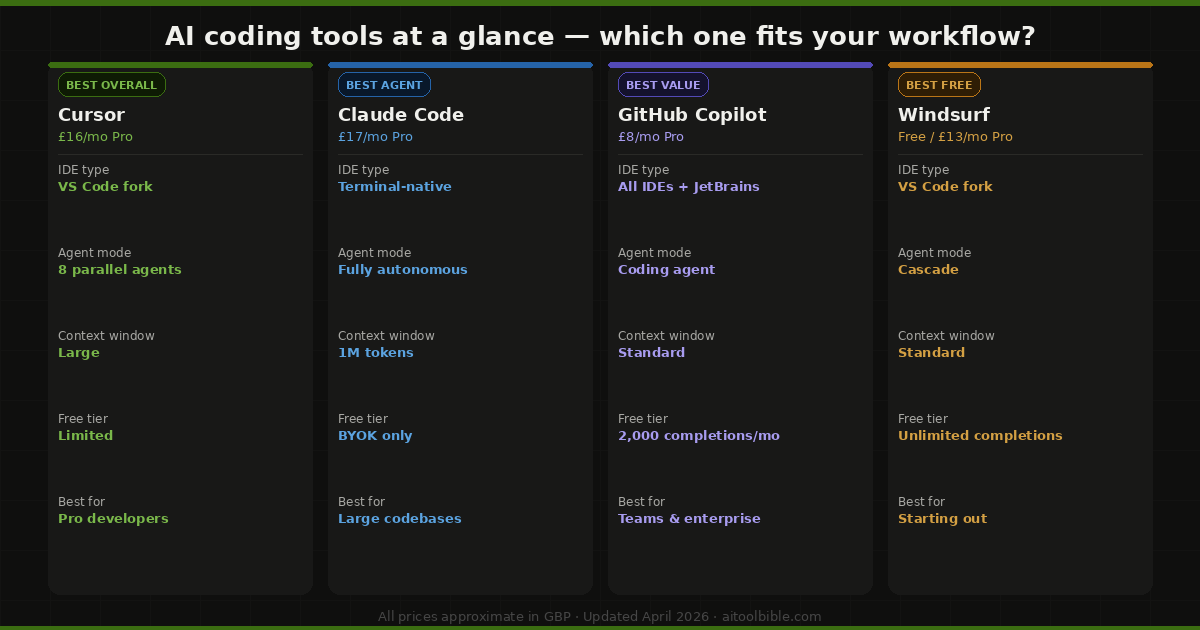
- Best overall: Cursor — the most polished AI-integrated IDE, deepest agent mode, multi-model support
- Best autonomous agent: Claude Code — strongest model, 1M token context window, terminal-native agentic workflows
- Best value: GitHub Copilot — £8/month, works in every IDE, genuinely capable free tier
- Best free AI IDE: Windsurf — unlimited free completions, Cascade agent, excellent starting point
- Best for non-developers: Bolt.new or Lovable — describe your app in English, get working code deployed
- Best for fully autonomous feature development: Devin — the first true AI software engineer
- Best for UI components: v0 by Vercel — generate React and Tailwind components from prompts
1. Cursor — Best overall AI coding tool
Price: Free / £16/month (Pro) / £60/month (Pro+)
Cursor is the benchmark everything else is measured against in 2026. Built as a fork of Visual Studio Code, it wraps a familiar interface around genuinely powerful AI capabilities — and the result is the most polished AI coding experience available.
The Composer feature is the core of what makes Cursor different. You describe a multi-file change in plain English — add a new API endpoint, refactor the authentication system, migrate from one library to another — and Cursor edits across files simultaneously, showing you a visual diff before applying anything. It is a fundamentally different workflow from autocomplete, and once you have used it for complex tasks, it is hard to go back.
Cursor's agent mode now supports up to 8 parallel cloud agents, introduced in early 2026, enabling it to execute complex multi-file refactoring across entire codebases simultaneously. In benchmark testing by iBuidl Research, Cursor completed a responsive data table component in just 2 rounds of prompting, versus 3 for Windsurf and 5 for GitHub Copilot. For a 3,000-line Express.js migration from CommonJS to ESM, Cursor required manual adjustments in 4 files — a minor quibble against a largely autonomous result.
Cursor supports multiple AI models — GPT-4o, Claude Sonnet 4.6, Gemini 2.5 Pro and GPT-5 beta access — and the recently introduced .cursorrules files let you define project-specific AI behaviours so it follows your coding conventions automatically. The developer community around Cursor is the largest in the AI coding space, which means excellent documentation and a growing library of shared rule configurations.
Best for: Professional developers working on large codebases, teams doing complex multi-file refactoring, anyone wanting the most polished AI IDE experience.
2. Claude Code — Best for complex autonomous tasks
Price: From £17/month (Pro) / £100/month (Max)
Claude Code takes a different approach to every other tool on this list. Rather than wrapping an IDE, it lives in the terminal — and it is built from the ground up as an autonomous coding agent rather than an assistant. You describe what you want, and Claude Code plans and executes it with significantly less hand-holding than its competitors.
The 1 million token context window is the standout technical specification. Where most AI coding tools struggle with codebases over a few hundred files, Claude Code can ingest and reason across 30,000-line codebases, maintaining coherent understanding across hundreds of files simultaneously. For large enterprise codebases or complex legacy code migrations, this is not a marginal improvement — it is the difference between the tool being usable and not.
Claude Code scores 80.8% on SWE-bench Verified, the industry benchmark for real-world software engineering tasks — the highest score of any publicly available coding tool. It handles deep git integration natively, can run parallel agent workflows via its Agent Teams feature, and excels at the reasoning-heavy tasks that other models handle poorly: debugging subtle logic errors, understanding complex architectural decisions, and explaining why existing code behaves the way it does.
The terminal-only interface is the main trade-off. There are no visual diffs, no inline autocomplete and no drag-and-drop context loading. Developers who are IDE-first will find the workflow unfamiliar. But for developers comfortable in the terminal — particularly those doing complex refactoring, code review or working across large monorepos — Claude Code is the strongest tool available.
Best for: Senior engineers working on large or complex codebases, terminal-native developers, anyone doing reasoning-heavy tasks like debugging, architecture review or legacy code migration.
3. GitHub Copilot — Best value and widest compatibility
Price: Free (2,000 completions/month) / £8/month (Pro) / £19/month (Business) / £39/month (Enterprise)
GitHub Copilot is the original AI coding assistant and, despite fierce competition, remains the most widely used tool in the market — serving over 1.8 million paying developers. The reasons are straightforward: it is the best value at any tier, it works in every major IDE (VS Code, JetBrains, Neovim, Xcode and even Vim), and it has the most reliable enterprise compliance story of any tool in this space.
At £8/month, Copilot Pro offers 300 premium requests per month, a coding agent, code review integration and multi-model support including Claude Opus 4.6, Gemini 2.0 Flash and GPT-4o. The free tier is genuinely useful for learning and occasional use. The £39/month Enterprise tier adds IP indemnification and compliance features that make it the only realistic option for large regulated enterprises.
The main limitation compared to Cursor or Claude Code is context. Copilot's inline suggestions are fast and often accurate for single-file work, but it struggles with multi-file refactoring tasks that require understanding the whole codebase. For JetBrains IDE users, however, it is effectively the only serious option — Cursor and Windsurf are both VS Code forks. If your primary IDE is IntelliJ, PyCharm or WebStorm, Copilot is the straightforward choice.
The free tier is the best starting point for anyone new to AI coding tools — enough completions to evaluate the experience properly without spending anything.
Best for: JetBrains users, teams that need enterprise compliance, beginners, developers who want AI assistance without switching their IDE, anyone prioritising value.
4. Windsurf — Best free AI IDE
Price: Free (individual) / £13/month (Pro) / £200/month (Max)
Windsurf, developed by Codeium and now with over 1 million users, has matured into a genuine Cursor alternative in 2026. It shares Cursor's VS Code fork foundation but takes a different approach to AI assistance — more autonomous, more proactive, and with a stronger free offering.
The Cascade agent is Windsurf's standout feature. Rather than requiring you to describe changes and review diffs as Cursor's Composer does, Cascade runs more autonomously — reading files, running commands, observing output and iterating without as much steering. For repetitive implementation tasks like CRUD operations, test generation and boilerplate code, Cascade's delegate-and-come-back approach is often faster than Cursor's more interactive workflow.
Windsurf's free individual plan includes unlimited basic completions — a significant differentiator in a market where most free tiers are heavily restricted. The Supercomplete feature predicts your next moves by analysing code context before and after your cursor, displaying suggestions as visual diffs rather than inline text. Zero Data Retention is on by default, which is particularly valuable for privacy-sensitive codebases.
The main caveat is the pricing restructure in March 2026, which switched from a credit system to daily and weekly quotas — a controversial change that caught some heavy users by surprise. At the £13/month Pro tier, Cursor's unlimited Auto mode currently offers more predictable daily throughput. But as a free starting point for developers exploring AI-assisted coding, nothing in the market competes with Windsurf's free tier.
Best for: Developers new to AI-assisted coding, anyone wanting to start for free, privacy-conscious development teams, repetitive implementation tasks where autonomous execution is preferred.
5. Devin — The first AI software engineer
Price: From £450/month
Devin occupies a different category to every other tool on this list. It is not a coding assistant or an IDE extension — it is an autonomous software engineer that takes on entire tasks independently. Give Devin a GitHub issue, a feature specification or a bug report, and it will plan the approach, write the code, run the tests, handle the failures and open a pull request, entirely without human intervention.
The price reflects both the capability and the intended audience. At £450/month, Devin is positioned at engineering teams rather than individual developers. The value proposition is clear: for tasks that would take a developer half a day — setting up a new integration, implementing a well-specified feature, fixing a documented bug — Devin can complete them overnight or while the team is in a meeting. The economics only work if you are consistently using it for tasks that justify the cost.
Devin works best with well-specified, self-contained tasks. Vague requirements, complex interdependencies or tasks requiring significant architectural judgement still need human involvement. Think of it less as a replacement for your developers and more as an additional engineer who works overnight, does not need hand-holding on straightforward tasks, and can handle the backlog of well-documented issues that never quite make it to the top of the sprint.
Best for: Engineering teams with a backlog of well-specified tasks, organisations wanting to accelerate delivery on clearly-scoped features, teams exploring fully autonomous code generation.
6. Bolt.new — Best for building apps without coding
Price: Free (1M tokens/month) / From £16/month
Bolt.new is not primarily a coding tool — it is an app builder. The distinction matters: while Cursor and Claude Code are built for developers, Bolt.new is built for founders, product managers, designers and anyone who wants to turn an idea into a working application without writing code themselves.
The workflow runs entirely in-browser via StackBlitz WebContainers. You describe your application in plain English — "a project management app with user authentication, task boards and deadline reminders" — and Bolt.new generates a full-stack application including database, API and hosting. The free tier provides 1 million tokens per month, which covers a meaningful amount of app building before you need to pay.
The output is real, deployable code rather than scaffolding or templates. For simple to moderately complex applications, the quality is genuinely impressive. For complex enterprise applications or anything requiring deep customisation, developers will eventually need to get into the generated code — but for getting to a working prototype or MVP, nothing is faster.
Best for: Non-technical founders and product managers, rapid prototyping, MVPs, anyone who wants to test an idea without hiring a developer first.
7. Lovable — Best for full-stack web apps from prompts
Price: Free / From £19/month
Lovable focuses specifically on web applications and does them well. Describe what you want to build, and Lovable generates a full-stack app with a React frontend, Supabase backend and hosting — ready to deploy in minutes. It is particularly strong for applications with standard patterns: SaaS products, dashboards, CRUD applications and internal tools.
Where Bolt.new is more general-purpose, Lovable is opinionated about the stack and stronger within those constraints. The Supabase integration is seamless, making it the better choice for apps that need a proper database backend from day one rather than local state. The free tier is limited but enough to validate an idea before committing to a paid plan.
Best for: Founders building SaaS MVPs, developers prototyping full-stack applications, anyone building on the React and Supabase stack.
8. v0 by Vercel — Best for UI components
Price: Free / From £16/month
v0 is Vercel's AI component generator and it occupies a useful niche: generating React, Tailwind and shadcn/ui components from prompts, image uploads or rough sketches. Describe a component or upload a screenshot, and v0 produces production-ready React code that you can copy into your project or continue refining through conversation.
For frontend developers and teams working in the Next.js ecosystem, v0 is a significant time saver on UI work. It integrates naturally with Vercel deployments and understands Tailwind conventions better than general-purpose models. It is not a full IDE replacement — it is a specialist tool for the specific task of generating UI components — and for that task it is the best option available.
Best for: Frontend developers, Next.js teams, designers who want to convert mockups to code, anyone generating React components regularly.
9. Replit — Best for learning and collaborative coding
Price: Free / From £16/month
Replit is a cloud-based IDE that runs entirely in the browser — no installation, no setup, no local dependencies. Its AI assistant, powered by the Replit Agent, can build entire applications from natural language prompts, making it one of the most accessible entry points into AI-assisted development.
For students, beginners and developers who work across multiple machines, Replit's browser-based approach removes the friction of environment setup entirely. The collaborative features — real-time multiplayer editing, comments and shared workspaces — make it the strongest option for pair programming and educational settings. The AI assistant is meaningfully weaker than Cursor or Claude Code on complex tasks, but for learning to code and building straightforward applications, it covers everything most users need.
Best for: Students and beginners, developers who need a consistent environment across machines, collaborative and educational settings, rapid prototyping without local setup.
Which AI coding tool should you use?
The right answer depends entirely on how you work and what you are building:
- Professional developer, VS Code user: Start with Cursor Pro at £16/month. It is the most polished experience and the productivity gains justify the cost quickly.
- Professional developer, JetBrains user: GitHub Copilot Pro at £8/month. There is no serious alternative for IntelliJ and PyCharm.
- Complex codebases, terminal-first: Claude Code. The 1M token context and autonomous agent capabilities are in a different class for large, complex projects.
- Starting out or budget-constrained: Windsurf free tier, then GitHub Copilot free. Both are genuinely capable without spending anything.
- Building an app without coding: Bolt.new for the fastest path from idea to prototype. Lovable if you are building a full-stack web application on Supabase.
- Frontend and UI work: v0 by Vercel for component generation, alongside your main IDE tool.
- Team with a documented backlog: Consider adding Devin for overnight autonomous task completion — but only once you have well-specified issues.
The most common professional setup in 2026 is two tools working together: a terminal agent (Claude Code or an open-source equivalent) for heavy autonomous work, and an IDE tool (Cursor or Copilot) for day-to-day editing. The terminal agent handles the big refactors and complex implementations while you are away; the IDE tool handles the moment-to-moment coding where fast autocomplete and visual diffs matter.
Frequently asked questions
Is Cursor better than GitHub Copilot?
For complex multi-file work on large codebases, yes — Cursor's Composer and agent mode are meaningfully more capable. For simple autocomplete and inline suggestions, Copilot is faster and cheaper, and is the only option for JetBrains IDE users. Many developers use both: Copilot for quick edits and Cursor for anything that touches multiple files.
Is Claude Code worth the price?
For developers who regularly work on large codebases or complex tasks, yes. The 1M token context window and 80.8% SWE-bench score make it the most capable autonomous coding agent available. At £17/month for the Pro tier it is reasonable for individual developers. At £100/month for Max it needs to be a primary productivity tool to justify the cost.
Can I use AI coding tools for free?
Yes, and the free tiers are genuinely useful in 2026. Windsurf's individual plan includes unlimited basic completions. GitHub Copilot Free offers 2,000 completions per month. Bolt.new provides 1 million tokens per month on the free plan. These are enough to properly evaluate the tools before committing to a paid plan.
What is the difference between an AI coding assistant and an AI coding agent?
An assistant suggests code as you type and answers questions. An agent plans a multi-step approach, edits files across your project, runs commands, handles errors and iterates autonomously. All the major tools now have agentic capabilities, but the quality gap between them is significant. Claude Code, Cursor's agent mode and Windsurf's Cascade represent the current state of the art. Devin goes furthest — it operates entirely independently on assigned tasks.
Will AI coding tools replace developers?
The evidence from 2025 and 2026 suggests not — at least not yet and not in the ways most people imagined. What AI coding tools actually do is make developers significantly more productive, particularly on routine and repetitive work. The tasks that still require human judgement — architectural decisions, translating vague business requirements into good software design, identifying what the system should actually do rather than just implementing what was specified — remain firmly human. The developers who will be most affected are those doing purely mechanical implementation work with no design input.