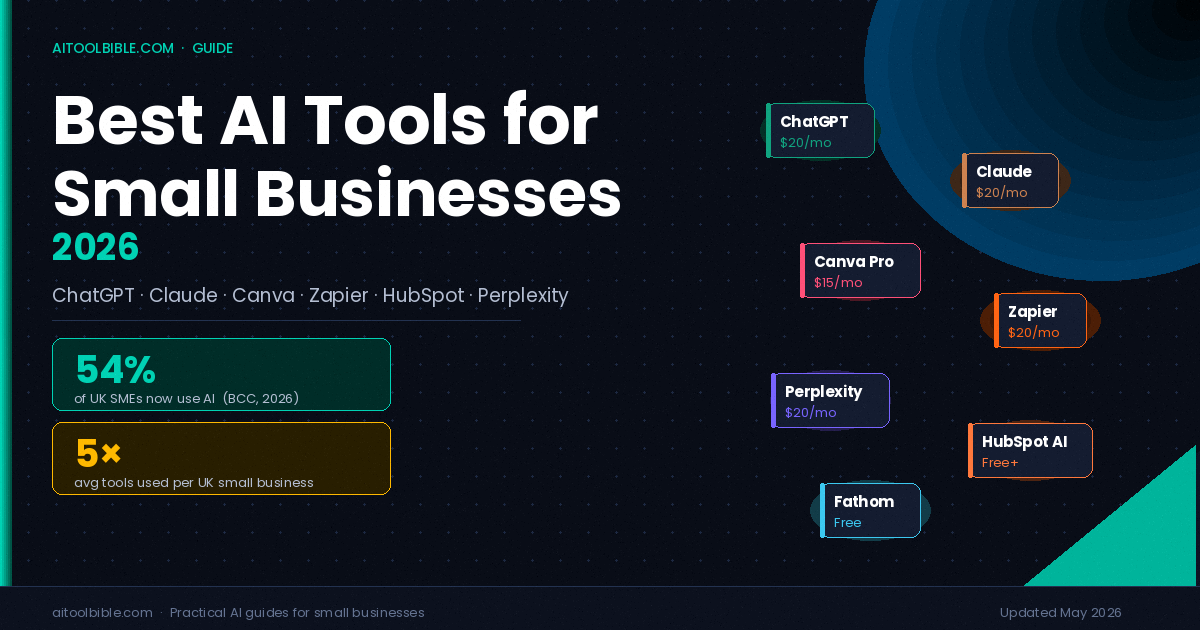
In March 2026, the British Chambers of Commerce published research showing that 54% of UK small and medium-sized businesses are now actively using AI — up from 35% in 2025 and 25% the year before. AI adoption among UK small businesses has more than doubled in two years. If you're reading this and haven't started yet, you're in the 46%. And according to the same research, SMEs already using AI report productivity expectations 71 percentage points higher than those sitting on the fence.
The practical question isn't whether to adopt AI. It's which tools are actually worth your money, and which are expensive subscriptions solving problems you don't have. This guide covers the tools that consistently deliver for small businesses in 2026, organised by what they do rather than hype, with clear assessments of cost and who each is genuinely best suited for.
The Reality Check Before You Start
The UK Government's own AI Adoption Research, published in early 2026, found that the most common reason businesses cited for adopting AI was to increase efficiency or productivity — reported by 65% of adopters. The second and third most common reasons were improving employee experience (16%) and reducing costs (12%). What this tells you is that AI works best as a productivity tool, not a magic growth engine.
The same research found that skills gaps are the biggest barrier to adoption, cited by over 60% of UK businesses. The fix isn't buying more tools. It's picking two or three that match your highest-volume, most repetitive tasks, and actually learning to use them properly.
The typical UK small business now uses a median of five AI tools. The most successful ones aren't picking five at random — they're building a deliberate stack where each tool addresses a specific, identified pain point.
With that in mind, here are the tools worth building that stack around.
AI Assistants: Your General-Purpose Starting Point
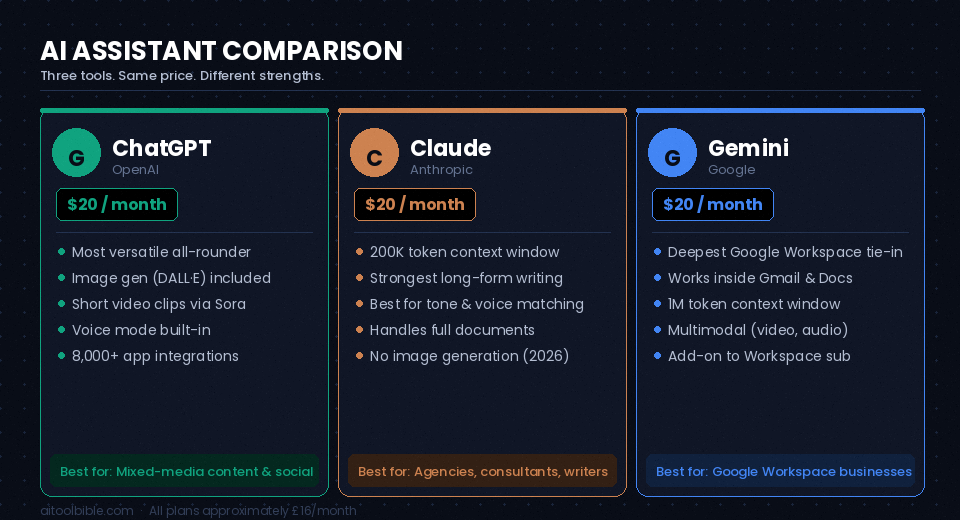
For most small businesses, an AI assistant is the first tool adopted and, often, the most used. The three main contenders — ChatGPT, Claude, and Google Gemini — are all priced at roughly £16–18 per month for their standard paid tiers, making the choice less about cost and more about fit.
ChatGPT (OpenAI)
ChatGPT remains the most widely used AI assistant among UK small businesses, and for good reason: it handles the broadest range of tasks in a single interface. The Plus plan at $20/month (approximately £16) includes image generation via DALL-E, short video clips via Sora, and voice mode — making it the strongest single-tool option if your work involves visual content or social media. OpenAI launched GPT-5.5 in April 2026, and the free tier now runs on a capable model, though it carries ads for US users and rate limits everywhere.
Best for: Businesses that need a versatile all-rounder, particularly those producing mixed-media content — written, visual, and voice.
Limitation to know: The free tier now includes advertising. On Plus, your conversations may be used to train OpenAI's models unless you manually opt out in settings — something to check if you handle client data.
Claude (Anthropic)
Claude's reputation among heavy writers and those working with long documents has grown significantly in 2026. Its 200,000-token context window on paid plans means you can paste an entire business plan, a lengthy contract, or a full year of email correspondence into a single conversation without the AI losing track of earlier details. Claude Pro, at $20/month, is widely considered the strongest option for nuanced long-form writing where tone and voice consistency matter — drafting proposals, client-facing communications, and detailed reports.
Best for: Businesses that rely on long-form writing: consultants, agencies, professional services firms, anyone producing substantial written client deliverables.
Limitation to know: Claude does not natively generate images, video, or audio as of mid-2026. If visual content creation is a priority, you'll need a separate tool.
Google Gemini
Gemini's strongest selling point in 2026 is integration: if your business already runs on Google Workspace — Gmail, Docs, Drive, Sheets, Meet — Gemini works inside those tools without copy-pasting between applications. Google restructured its AI plans in early 2026, and the Workspace Gemini add-ons start at $20/user/month on top of a Workspace subscription, which adds up quickly for small teams. However, for businesses already committed to the Google ecosystem, the integration removes enough friction to justify the cost.
Best for: Businesses already living inside Google Workspace who want AI woven into existing workflows rather than running as a separate application.
Practical note: Many small business owners use ChatGPT or Claude as their primary assistant and keep Gemini's free tier for Google Workspace-specific tasks — a reasonable compromise before committing to a paid Workspace add-on.
Visual Content and Design: Canva Magic Studio
Canva is used by over 220 million people globally, and in 2026 its Magic Studio AI suite has moved well beyond novelty. The core tools — Magic Design (layout generation from a text prompt), Dream Lab (text-to-image), Magic Write (copywriting assistance), Magic Resize, Magic Eraser, and Background Remover — are available on the free plan with monthly credit limits, and unlock fully on Canva Pro at $15/month (approximately £12).
For a small business producing regular social media content, the practical workflow looks like this: you upload your brand logo and set your colour palette once in the Brand Kit (a Pro feature), and every AI-generated design automatically respects those brand guidelines. Canva's Bulk Create feature can generate 30 or more customised social posts from a spreadsheet in under five minutes — a significant time saving for businesses running regular promotions or product updates.
Best for: Any business that produces regular marketing visuals but doesn't have a dedicated designer. Particularly strong for local businesses, e-commerce, coaches, and content creators.
Limitation to know: Pro gives you 500 AI credits per month. These don't roll over, and there's no option to buy additional credits without upgrading to the Teams plan. Heavy AI image generators may exhaust these mid-month.
Automation: Zapier
Zapier connects more than 8,000 applications and, since a 2025 rebrand, positions itself as an AI orchestration platform rather than just a connector. Its AI Copilot feature lets you describe an automation in plain English — "when I get a new lead from my contact form, add them to my CRM and send me a Slack message" — and Zapier builds the workflow. The platform's 2026 additions include Zapier Agents, which can autonomously read emails, run research, and take actions across connected apps.
For a small business, the most valuable use cases are the simple ones: automating the movement of data between tools that don't natively communicate. A plumber who uses a booking form, a Google Sheet, and a WhatsApp number spends real time manually connecting those three things. Zapier removes that entirely.
The free plan covers 100 tasks per month — enough to trial it. The Professional plan starts at $19.99/month for 750 tasks. The honest caveat is that costs scale quickly: businesses with multiple active automations regularly find themselves on the Team plan ($69/month) or above once they get past basic use cases.
Best for: Businesses running three or more tools that don't talk to each other. The highest-value automations are typically lead routing, CRM updates, and invoice-to-spreadsheet logging.
Limitation to know: Zapier's per-task pricing model can produce unexpected bills if a workflow runs more often than anticipated. Build in task monitoring from the start, and set overage alerts.
CRM and Marketing: HubSpot Breeze
HubSpot's AI layer — branded as Breeze — is built directly into the HubSpot CRM and covers the full customer journey: content creation, lead scoring, email sequences, pipeline forecasting, and customer service. For a small business already using HubSpot, Breeze is effectively free to start. The standout feature for small businesses is Breeze Copilot, which generates and edits emails, blog posts, and summaries in context — meaning it can see your CRM data and write outreach emails that reference a lead's actual history with your business.
HubSpot's free tier is genuinely generous: it includes a CRM, basic email marketing, a website builder, and limited AI features. The Starter plan begins at $15 per seat per month. The jump to Professional is significant — Marketing Hub Professional starts at $890/month for three seats — so most small businesses will stay on Starter or free for some time.
Best for: Small businesses that need a CRM and want AI features built in from the start, rather than bolted on later. Strong for sales-led businesses: agencies, consultants, B2B service providers.
Limitation to know: HubSpot creates meaningful switching costs over time. The deeper you embed your data, the harder it becomes to leave. Consider that before committing.
Meeting Notes and Admin: Fathom
Every hour-long client meeting produces follow-up work: a summary, action items, notes to update in the CRM. Fathom joins your video calls — on Zoom, Google Meet, or Teams — records them, and produces a structured summary with action items, decisions, and key points within minutes of the call ending. It then syncs those summaries directly to HubSpot, Salesforce, or Pipedrive if you have them connected.
Fathom's free tier is one of the more genuine free offers in this space — it covers unlimited meeting recordings and basic summaries without a time limit. Paid plans add features like CRM integration, custom templates, and team-level access.
Best for: Anyone in client-facing work who takes regular video calls. The time saving is immediate and the setup takes under ten minutes.
Research: Perplexity AI
Perplexity functions as an AI-powered search engine: you ask a question, it searches the web, synthesises the results, and cites every source inline so you can verify the claims. For small businesses doing competitor research, market analysis, preparing for client meetings, or staying on top of industry news, Perplexity removes the time spent triangulating between multiple search results.
The free tier handles most research needs. Perplexity Pro at $20/month adds faster models, more searches per day, and file upload capabilities. A practical combination used by many small business owners is Claude Pro for writing and Perplexity Pro for research — both at $20/month, covering most daily knowledge-work needs.
Best for: Businesses where staying current matters: marketing, PR, recruitment, legal, and professional services. Also useful for any business that pitches or presents regularly and needs to back up claims with reliable information quickly.
Building Your Stack: A Practical Approach
The common mistake is buying several AI tools at once and using none of them consistently. The businesses getting genuine results in 2026 follow a different pattern: they start with one or two tools, learn them thoroughly, and add others only once a specific new pain point is clear.
A practical starting point for most UK small businesses looks like this:
- One AI assistant (ChatGPT, Claude, or Gemini depending on your primary use case) — handles writing, research, summarising, drafting
- Canva Pro if you produce regular visual content — social media, presentations, marketing materials
- Fathom if you take regular video calls — eliminates post-meeting admin entirely
- Zapier once you have three or more tools that need to talk to each other
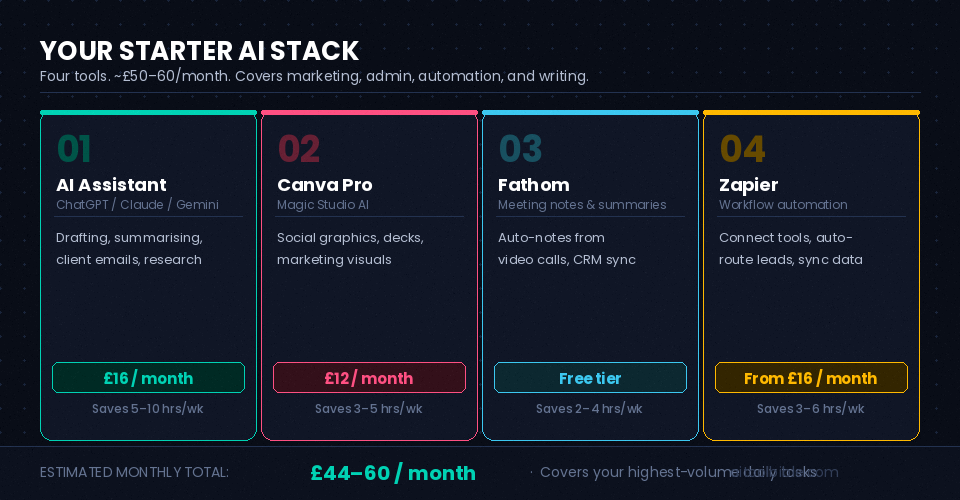
That four-tool stack costs roughly £50–60/month and covers the highest-volume daily tasks for most small businesses. Add HubSpot or Perplexity when a specific need makes them the obvious next step.
A Note on Data Privacy for UK Businesses
UK GDPR applies to how you use AI tools with customer data. The practical rule is straightforward: don't paste identifiable client information — names, email addresses, financial details — into consumer-tier AI assistants. Business and Team plans on ChatGPT and Claude explicitly exclude your data from model training and offer stronger privacy terms. If you're handling sensitive client data, upgrade to a business tier or check each provider's data processing terms before you start.
What the Research Actually Tells You
The BCC research also found that 95% of UK SMEs using AI reported no impact on workforce size over the past year, and 86% said job roles had remained unchanged. The productivity gains are real — but they show up as hours saved on specific tasks, not as headcount reduction. A three-person agency using AI well might produce the output of a five-person team without hiring anyone. That's a meaningful competitive advantage, but it doesn't happen by accident.
The businesses in the 54% who are actively using AI and seeing results share one characteristic: they identified specific tasks consuming disproportionate time before they picked a tool. Start there. List your ten most time-consuming weekly tasks. Pick the two or three that are repetitive, predictable, and don't require a human judgement call. Those are your first AI use cases. Once they're running smoothly, expand from there.
The 46% who haven't started yet aren't being left behind permanently — but the gap is widening. The barrier to entry is lower than most assume. A free ChatGPT account and an hour to learn how to prompt it properly is enough to start seeing value this week.